
Google Antigravity Down? 'Models Not Loading' & Login Errors Reported in Global Outage (Live Updates & Fixes)
Is Google Antigravity Down? (Breaking News Update)
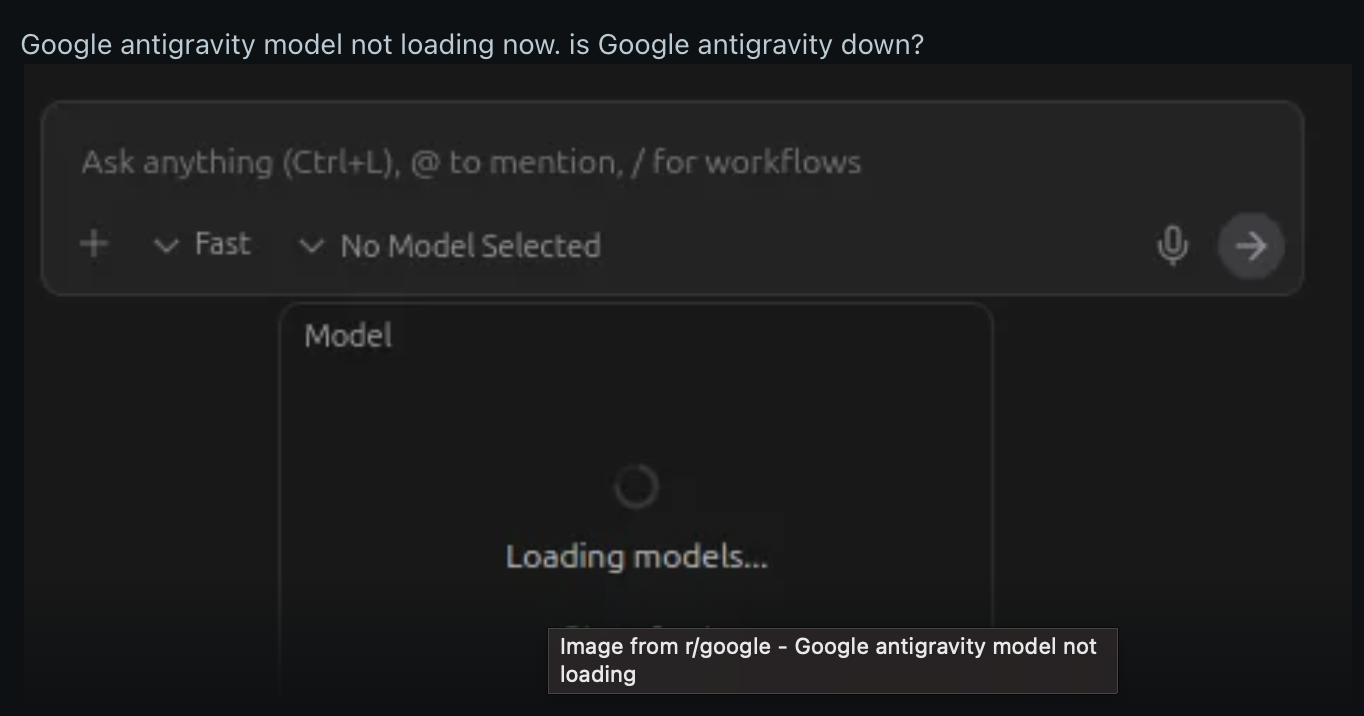
Current Status: Resolved (See Update Below). As of the last two hours, thousands of developers worldwide are reporting that Google Antigravity is down. Users are currently unable to load models, are being forcibly logged out, or are stuck in an infinite login loop.
If you are seeing the error “There was an unexpected issue setting up your account” or your agent has terminated unexpectedly, you are not alone.
At SDA Business, we are tracking this situation closely. Below are the specific symptoms of this crash and the temporary workarounds that the community has discovered to get you back online.
The Symptoms: What Users Are Facing
According to reports flooding the Google AI Developers Forum and Stack Overflow, the outage began roughly two hours ago. The issues appear to stem from a backend failure in Google's authentication and model serving infrastructure.
- Models Not Loading: Users can log in, but the model selector remains empty or stuck on "Loading models" indefinitely.
- The Login Loop: Many users attempted to fix the glitch by logging out, only to find they could not log back in. The Web OAuth flow completes, but the redirect back to the Antigravity IDE fails.
- Agent Failure: Active sessions are crashing with the message: "Agent execution terminated due to model provider overload" or generic connection errors.
- Reinstalling Does Not Help: Multiple users have reported that uninstalling and reinstalling the IDE does not resolve the issue.
How to Fix "Antigravity Not Working" (Community Workarounds)
While Google engineers are reportedly investigating the issue, developers on Reddit and Stack Overflow have identified a specific workaround that is bypassing the network block for many users.
Fix #1: The Mobile Hotspot Method (Highest Success Rate)
Strangely, this specific outage seems to affect standard LAN/Wi-Fi connections differently than mobile data connections.
- Disconnect your computer from your current Wi-Fi or Ethernet connection.
- Enable a Mobile Hotspot on your smartphone and connect your computer to it.
- Relaunch Antigravity. Many users report that the login handshake completes successfully over mobile data.
- Switch Back: Once authenticated and models are loaded, some users have successfully switched back to their main Wi-Fi.
Fix #2: Deep Cache Clear
If the hotspot method fails, you may need to clear corrupted tokens stored locally.
- Windows: Navigate to
%APPDATA%\Antigravityand delete the folder contents. - macOS: Clear
~/Library/Application Support/Antigravity/Cache. - Restart: Relaunch the application and attempt to sign in again.
Standard Troubleshooting for Antigravity Glitches
If the server-side outage resolves but you are still facing issues, consult this checklist derived from Skywork AI's troubleshooting guide. These are common configuration errors that prevent the IDE from working:
- Check Installation Path (Windows): Installing Antigravity outside of the default drive can cause login loops. Ensure it is installed at
C:\Program Files\Antigravity—this reportedly fixes 70% of login loops. - WSL2 Requirement: If you are on Windows, ensure WSL2 is installed and active (
wsl --list --verbose). If the terminal fails silently, this is usually the culprit. - Hardware Compatibility: Antigravity requires a CPU that supports AES-NI (post-2013) and at least 8GB of RAM. Older hardware may fail to launch the agent entirely.
- Model Overload: If you receive "provider overload" errors, try downshifting from "Gemini 3 Pro High" to "Standard" or "Low" in the bottom-right model selector.
The Post-Mortem: What Caused the Outage?
Technical analysis and reports from within the Google Cloud ecosystem suggest that today’s "Antigravity Not Working" crisis was not a failure of the AI models themselves, but rather a sequence of IP filtering and routing errors within Google's authentication layer.
- Regional Handshake Failures: The issues were primarily seen in the OAuth 2.0 redirect flow. When users attempted to log in, the authentication server failed to acknowledge specific residential IP ranges, leading to the infamous "infinite loading" screen.
- Routing Conflicts: A misconfigured update in Google's Edge Network routing caused certain model serving endpoints to become unreachable from standard home/office Wi-Fi networks, while remaining accessible via mobile data (which uses different routing paths).
- Partial Recovery: This explains why the Mobile Hotspot workaround was so successful; it forced the connection through a different gateway that hadn't been impacted by the routing table errors.
Community Reaction
The developer community has expressed frustration, particularly as this outage has hit during critical deadlines.
"Just the other week it was down for almost a full day, and now this. At this rate, they’ll never leave preview." — User on Google AI Developers Forum.
"One day before some major deadline... Typical." — User on Reddit.
Stay Tuned
We will update this article at sdabusiness.com as soon as Google issues an official patch or service restoration. For now, we recommend attempting the Mobile Hotspot workaround to bypass the current handshake failure.
UPDATE (Service Restored): Antigravity is Back Online!
Status: Resolved.
As of just a few minutes ago, Google has resolved the backend issues causing the outage. Model loading, login flows, and agent executions are once again stable. If you are still seeing errors, simply restart the application or follow the Cache Clear steps above to refresh your session.
Happy coding—Antigravity is officially back in orbit!